 DarkGPT
Three ways to open a ticket
All three channels reach the same team and carry the same weight: just pick the one you already use. There is no point opening a ticket on every channel for the same request, it won’t go any faster.
- A ticket on the site: ideal if you are already logged in to darkgpt.chat. Your request is linked to your account.
- Telegram: open @DarkGPT_support_bot, describe your request, and the reply comes straight into the chat, on your phone or your computer.
- Discord: join the official Discord server and open a ticket. You will also find announcements, tips and the community there.
To keep up with news, guides and offers, also join the official Telegram channel: @darkgpt_officiel. It is an announcement channel: for a personal request, open a ticket.
Response time
The team replies usually within a few hours, 24 h max. Platinum and Diamond subscribers get priority: their tickets are handled first.
The best way to get a fast answer is a complete ticket from the very first message. A ticket that just says “it doesn’t work” forces the team to ask you questions, and every back-and-forth costs you time.
Write a good ticket in 5 steps
- Pick a single channelThe site, Telegram or Discord.
- Give your account emailThe one you log in with.
- Say which plan you haveFree, Basic, Gold, Platinum, Diamond, Lifetime, a gem pack or API and IDE credit. If you paid, add your order number.
- Describe the problemIn a few sentences, what you did, what happened, what you expected, and on which device.
- Add a screenshotOf the error message or the screen in question. For a PayPal payment, attach the payment proof.
The most common cases
PayPal payment to activate
Send a screenshot of your payment proof showing the date, time, amount and note (if there is one), along with your DarkGPT account email. The team activates your plan usually within a few hours, 24 h max.
Crypto payment not activated yet
With crypto, activation is automatic as soon as the payment is confirmed. If your access still doesn’t show up once the payment is confirmed, open a ticket with your order number and your account email.
A question about your gems
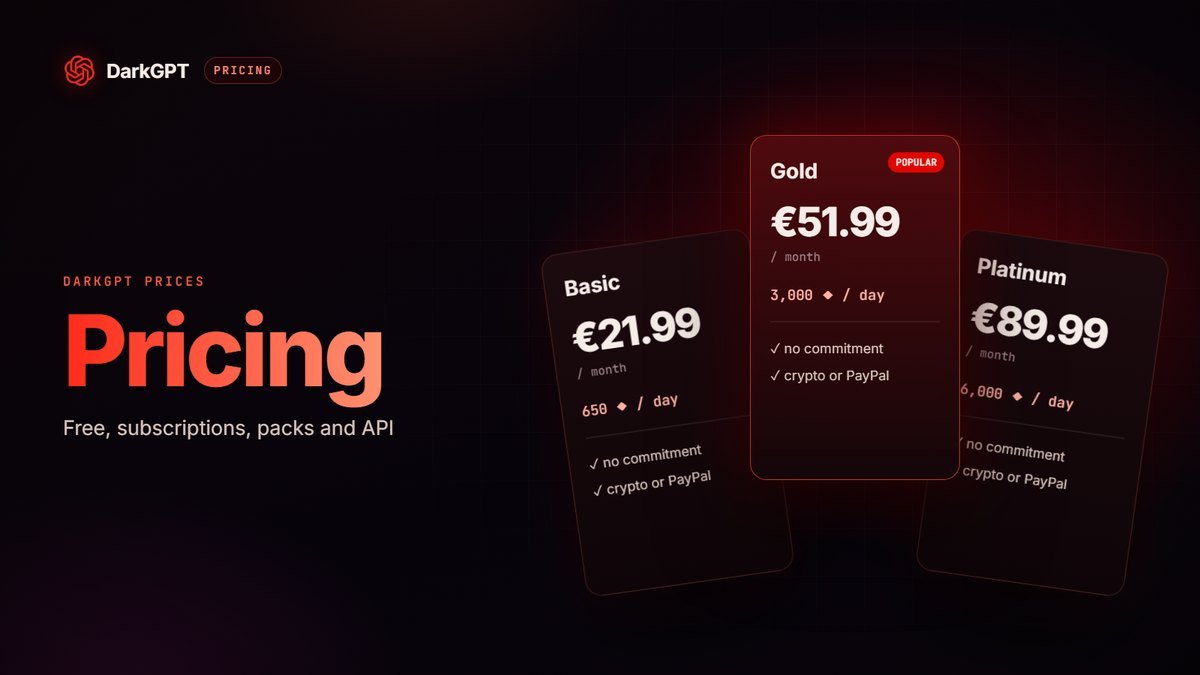
Before you write, check one thing: with a subscription, gems are refilled every day and don’t roll over. Gems from a pack, on the other hand, are used at your own pace. On the free plan, you get 50 gems at signup, then 50 every week. If your balance doesn’t match what you bought, send your order number, your account email and a screenshot of your balance. Every plan’s price is on the pricing page.
API and IDE credit
Credit for the API and the IDE is separate from gems. After your purchase in the shop, give your order number and your account email: the credit is usually added within a few hours (24 h max).
Account access
Give the account email and describe what is blocking you, with a screenshot of the message displayed. Never share your password, not even with support: the team doesn’t need it. Reminder: one account per person, multiple accounts (including via VPN or proxy) are detected and banned.
Halloween discount
Until October 31 at midnight, you get −10% on all subscriptions. The discount isn’t applied automatically: ask for it by opening a ticket on the site, on Telegram or on Discord, stating the subscription you want.
Bug
Describe what is happening, on which device and browser, and which model you used, with a screenshot if possible.
Account deletion
Open a ticket with the email of the account in question: the team takes care of deleting your account and your data.
What DarkGPT accepts, and what stays banned
Many support questions are about one thing: how far Unfiltered mode goes. The short answer: anything legitimate for an adult.
- Accepted: dark or violent fiction, dark humor, blunt criticism, sensitive historical or political topics, direct questions about health, sex or money.
- Banned: illegal use, or use meant to harm someone. It gets you banned.
The service is for adults 18+. Unsure about a specific case? Open a ticket: we’ll answer you straight.
Security: watch out for fake support
Official support only runs through darkgpt.chat, @DarkGPT_support_bot on Telegram and the official Discord server. No one on the team will ever ask for your password or for a payment outside the official shop.
- The team never asks for your password, not by ticket and not by private message.
- Watch out for fake support accounts that contact you first, on Telegram or Discord, with a username that looks like the real one. Support never reaches out to you: you are the one who opens the ticket.
- Only use the official links on this page and only pay in the official shop. A “special offer” sent by private message with another payment method is a scam.
A general question rather than a problem? Check the FAQ first: the answer may already be there.
Frequently asked questions
How do I contact DarkGPT?
By ticket from your account on darkgpt.chat, on Telegram (@DarkGPT_support_bot) or on the official Discord server. All three channels reach the same team.
Can I write very violent fiction with DarkGPT?
Yes: adult fiction, even very dark, is accepted. What’s banned is illegal use, or use meant to harm someone.
How fast does support reply?
Usually within a few hours, 24 h max. Platinum and Diamond subscribers get priority.
I paid with PayPal, what should I send?
A screenshot of your payment proof (date, time, amount, note) and your DarkGPT account email, by ticket.
How do I delete my account?
Open a ticket on the site, on Telegram or on Discord with the account email: the team takes care of the deletion.
Can support ask for my password?
No, never. The team doesn’t need it: the account email is enough. If someone asks for it, it is fake support.
How do I get the Halloween discount?
Open a ticket on the site, on Telegram or on Discord before October 31 at midnight: −10% on all subscriptions.